Scope — Oscilloscope
Auto-generated reference
For the definitive command list extracted directly from source code, see REPL Command Reference.
Controls oscilloscopes over VISA.
- Channels are numbered
1-4. Useallto affect every channel at once. - Multiple scopes are named
scope1,scope2, etc.
4-channel oscilloscope with USB interface. Full feature set including counter, DVM, cursors, recording, mask test, and built-in AWG.
4-channel InfiniiVision 1000 X-Series oscilloscope (70 MHz, 2 GSa/s) with USB/LAN interface. Full feature set including counter, DVM, cursors, mask test, built-in AWG (WGEN), screenshot, display, acquire, math, labels, invert, bwlimit, segmented acquisition, and measurement statistics. No recording support.
4-channel oscilloscope with USB/GPIB interface. Basic scope commands only.
Acquisition Control
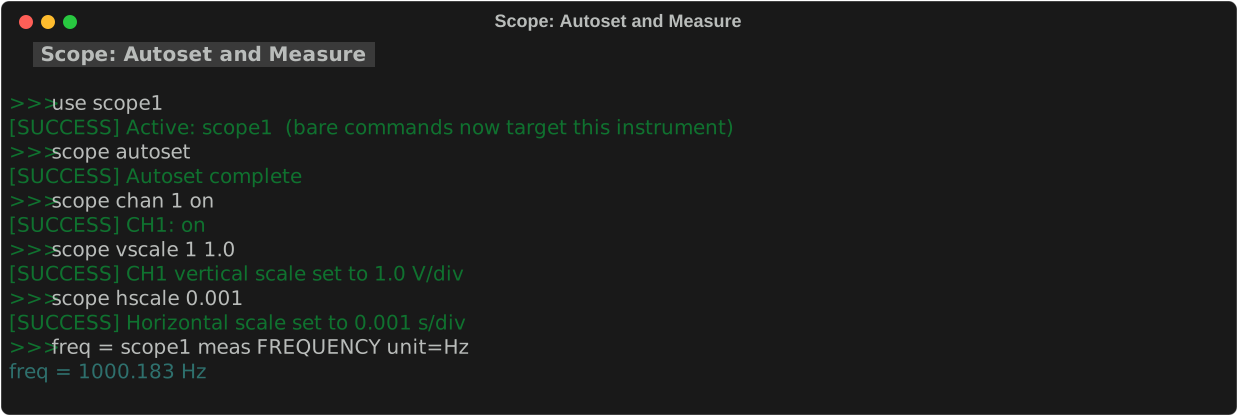
scope autoset
Auto-configure the scope for the current input signal.
Automatically adjusts time/division, voltage/division, and trigger settings to display the input signal cleanly. Equivalent to pressing the Autoset button on the front panel.
scope run / stop / single
scope run       # start continuous acquisition
scope stop      # freeze the display
scope single    # arm single-shot trigger
| Command | Effect |
|---|---|
run |
Start continuous acquisition (free-running) |
stop |
Freeze the display at the current waveform |
single |
Arm the trigger — capture one waveform then stop |
scope wait_stop
Block until the scope finishes its current acquisition (i.e. the trigger fires and the display stops).
| Parameter | Required | Default | Description |
|---|---|---|---|
timeout= |
optional | 10 |
Maximum seconds to wait. Prints a warning if the scope is still armed after this time. |
Use after scope single to ensure the trigger has fired before querying measurements. Without this, measurements may return 9.9e+37 (the SCPI sentinel for "not yet computed").
Channel Control
scope chan
Enable or disable channel display.
| Parameter | Required | Values | Description |
|---|---|---|---|
1-4\|all |
required | 1, 2, 3, 4, all |
Channel number, or all. |
on\|off |
required | on, off |
Show or hide the channel. |
scope chan 1 on      # show channel 1
scope chan 3 off     # hide channel 3
scope chan all on    # show all channels
scope coupling
Set input coupling for one or more channels.
| Parameter | Required | Values | Description |
|---|---|---|---|
1-4\|all |
required | 1–4, all |
Channel(s) to configure. |
DC\|AC\|GND |
required | DC, AC, GND |
Coupling mode. DC = pass all frequencies. AC = block DC component. GND = disconnect input (shows 0 V reference). |
scope probe
Set probe attenuation so the scope displays correct voltages.
| Parameter | Required | Values | Description |
|---|---|---|---|
1-4\|all |
required | 1–4, all |
Channel(s). |
attenuation |
required | 1, 10, 100 |
Probe attenuation ratio. 1 = direct connection, 10 = 10× probe, 100 = 100× high-voltage probe. |
scope probe 1 10    # channel 1 has a 10× probe
scope probe all 1   # all channels: direct (1×) connection
Horizontal (Time) Axis
scope hscale
Set the time per division.
| Parameter | Required | Values | Description |
|---|---|---|---|
s/div |
required | float (s) | Seconds per division. E.g. 0.001 = 1 ms/div, 1e-6 = 1 µs/div. |
scope hpos / hmove
Set or adjust the horizontal trigger position.
scope hpos <percentage>     # set absolute position
scope hmove <delta>         # adjust relative to current position
| Parameter | Required | Description |
|---|---|---|
percentage |
required (hpos) | Trigger position as percent of screen width. |
delta |
required (hmove) | Relative adjustment amount. |
Vertical (Voltage) Axis
scope vscale
Set voltage per division for one or more channels.
| Parameter | Required | Values | Description |
|---|---|---|---|
1-4\|all |
required | 1–4, all |
Channel(s). |
V/div |
required | float (V) | Voltage per division. |
pos |
optional | float (divisions) | Vertical position offset. Default: 0 (centered). |
scope vscale 1 0.5           # channel 1: 0.5 V/div
scope vscale 1 0.5 -2        # 0.5 V/div, shifted down 2 divisions
scope vscale all 1.0 0       # all channels: 1 V/div, centered
scope vpos / vmove
Set or adjust vertical position.
scope vpos <1-4|all> <divisions>    # set absolute position
scope vmove <1-4|all> <delta>       # adjust relative to current
Trigger
scope trigger
Configure the trigger.
| Parameter | Required | Values | Description |
|---|---|---|---|
channel |
required | 1–4 |
Trigger source channel. |
level |
required | float (V) | Trigger threshold voltage. |
slope= |
optional | RISE, FALL |
Edge to trigger on. Default: RISE. |
mode= |
optional | AUTO, NORM, SINGLE |
Trigger mode. AUTO = free-run if no trigger; NORM = wait for trigger; SINGLE = one-shot. Default: AUTO. |
scope trigger 1 0.0                           # ch1, 0 V threshold, rising edge
scope trigger 1 1.5 slope=FALL                # ch1, 1.5 V, falling edge
scope trigger 1 0.0 slope=RISE mode=NORM      # ch1, normal mode
Measurements
scope meas
Take and print a single measurement.
| Parameter | Required | Values | Description |
|---|---|---|---|
1-4\|all |
required | 1–4, all |
Channel to measure. |
type |
required | see below | Measurement type (case-insensitive). |
All types are case-insensitive. Aliases are separated by /.
Voltage
| Type / Aliases | Description |
|---|---|
VPP / PK2PK |
Peak-to-peak voltage |
VRMS / RMS |
RMS voltage |
ACRMS |
AC RMS voltage |
VMAX / MAXIMUM |
Maximum voltage |
VMIN / MINIMUM |
Minimum voltage |
VTOP / TOP |
Top voltage (high state) |
VBASE / BASE |
Base voltage (low state) |
VAMP / AMPLITUDE |
Amplitude (Vtop − Vbase) |
VAVG / MEAN / AVERAGE |
Mean voltage |
VMID / MID |
Mid voltage |
VUPPER / UPPER |
Upper threshold voltage |
VLOWER / LOWER |
Lower threshold voltage |
VARIANCE / VAR |
Voltage variance |
PVRMS |
Per-period RMS voltage |
TVMAX |
Time at Vmax |
TVMIN |
Time at Vmin |
Time
| Type / Aliases | Description |
|---|---|
FREQUENCY / FREQ |
Signal frequency |
PERIOD |
Signal period |
RISE / RISETIME |
Rise time (10%–90%) |
FALL / FALLTIME |
Fall time (90%–10%) |
PWIDTH |
Positive pulse width |
NWIDTH |
Negative pulse width |
Duty Cycle
| Type / Aliases | Description |
|---|---|
PDUTY / POSDUTY |
Positive duty cycle |
NDUTY / NEGDUTY |
Negative duty cycle |
Shape
| Type / Aliases | Description |
|---|---|
OVERSHOOT / OVER |
Overshoot |
PRESHOOT / PRE |
Preshoot |
PSLEWRATE / POSSLEW |
Positive slew rate |
NSLEWRATE / NEGSLEW |
Negative slew rate |
Area
| Type / Aliases | Description |
|---|---|
MAREA / AREA |
Waveform area |
MPAREA / PERIODAREA |
Period area |
Counts
| Type / Aliases | Description |
|---|---|
PPULSES |
Positive pulse count |
NPULSES |
Negative pulse count |
POSEDGES / PEDGES |
Positive edge count |
NEGEDGES / NEDGES |
Negative edge count |
Voltage
| Type | Description |
|---|---|
PK2PK |
Peak-to-peak voltage |
RMS |
RMS voltage |
CRMS |
Cycle RMS voltage |
MEAN |
Mean voltage |
AMPLITUDE |
Amplitude (high − low) |
MINIMUM |
Minimum voltage |
MAXIMUM |
Maximum voltage |
HIGH |
High voltage level |
LOW |
Low voltage level |
Time
| Type | Description |
|---|---|
FREQUENCY |
Signal frequency |
PERIOD |
Signal period |
RISE |
Rise time |
FALL |
Fall time |
PWIDTH |
Positive pulse width |
NWIDTH |
Negative pulse width |
Shape
| Type | Description |
|---|---|
POSOVERSHOOT |
Positive overshoot |
NEGOVERSHOOT |
Negative overshoot |
Note
scope meas prints the result but does not record it. Use the assignment syntax (label = scope meas 1 FREQUENCY unit=Hz) to save to the log.
scope meas_setup
Configure a measurement slot before capturing so the scope computes the value when the trigger fires.
| Parameter | Required | Values | Description |
|---|---|---|---|
1-4\|all |
required | 1–4, all |
Channel(s) to configure. |
type |
required | see measurement types above | Measurement to compute on next capture. |
scope meas_setup 3 RISE     # configure CH3 rise time slot
scope meas_setup 4 RISE     # configure CH4 rise time slot
scope single
scope wait_stop timeout=10
scope meas_force            # force DSP computation
ch3_rise = scope meas 3 RISE unit=s
Note
Call scope meas_setup before scope single. Use scope meas_force after wait_stop to ensure computation is complete before querying.
Not supported. The MSO2024 computes measurements on demand — use the assignment syntax (label = scope meas ...) directly after capture without a prior setup step.
scope meas_force
Force the scope's measurement DSP to compute all configured slots.
The DHO804 computes measurements lazily — values are only finalized when the display refreshes. scope meas_force triggers an internal display refresh (no file written) so that measurements return valid values immediately after scope wait_stop.
Note
Use after scope wait_stop and before taking measurements when you do not want to save a screenshot first. If you already call scope screenshot before measuring, this step is redundant.
Not supported. The MSO2024 computes measurements on demand — no force step is needed.
scope meas_clear
Remove all measurement items from the on-screen results panel.
Sends :MEASure:CLEar to hide the measurement sidebar. Use before scope screenshot to capture a clean image without the measurement overlay.
scope meas_loop
Continuously measure a channel at a fixed interval and print results. Press Ctrl+C to stop.
| Parameter | Required | Values | Description |
|---|---|---|---|
1-4\|all |
required | 1–4, all |
Channel(s) to measure. |
type |
required | see measurement types above | Measurement type. |
interval= |
optional | seconds (default 1.0) |
Time between measurements. |
count= |
optional | integer (default 0 = unlimited) |
Stop after this many samples. 0 runs until Ctrl+C. |
label= |
optional | string, no spaces | If provided, each reading is also stored to the measurement log (same as the assignment syntax). |
unit= |
optional | string | Unit shown in log (requires label=). |
scope meas_loop 1 FREQUENCY                         # print CH1 frequency every 1s, run forever
scope meas_loop 1 FREQUENCY interval=0.5            # measure every 500 ms
scope meas_loop 1 RMS count=10 label=vrms unit=V    # 10 samples, store each to log
scope meas_loop all PK2PK interval=2.0               # all channels, every 2s
Tip
Use count=N label=<name> together to collect a fixed number of samples and then pass them to calc for post-processing.
Recording measurements
Use assignment syntax to measure and store the result to the measurement log in one step:
| Parameter | Required | Values | Description |
|---|---|---|---|
label |
required | string, no spaces | Name for this entry in the log. Appears in log print and used as the bare variable name in calc expressions. Use underscores — e.g. ch1_freq. |
1-4\|all |
required | 1–4, all |
Channel to measure. |
type |
required | see measurement types above | Measurement type. |
unit= |
optional | string | Unit shown in log print (e.g. Hz, V). Display-only — does not affect the stored value or calculations. |
Then use in calculations:
scope meas_delay
Measure the time delay between two channels.
| Parameter | Required | Values | Description |
|---|---|---|---|
ch1 / ch2 |
required | 1–4 |
Source and reference channel numbers. |
edge1= / edge2= |
optional | RISE, FALL |
Which edge to detect on each channel. Default: RISE. |
scope meas_delay_store
Measure delay and record to the log.
| Parameter | Required | Values | Description |
|---|---|---|---|
ch1 / ch2 |
required | 1–4 |
Channel numbers. |
label |
required | string | Log entry name — same rules as the assignment syntax. |
edge1= / edge2= |
optional | RISE, FALL |
Edge selection. Default: RISE. |
direction= |
optional | FORWARDS, BACKWARDS |
Search direction. Default: FORWARDS. |
unit= |
optional | string | Unit shown in log (e.g. s, ms). Display-only. |
Waveform Capture
scope save
Download waveform data and save to a CSV file.
| Parameter | Required | Values | Description |
|---|---|---|---|
channels |
required | 1–4 or comma-separated |
Channel(s) to save. E.g. 1 or 1,2. |
file.csv |
required | file path | Output file. Created or overwritten. |
record= / time= |
optional | float (s) | Record for this many seconds before saving. |
points= |
optional | int | Number of waveform points to request from scope. |
scope save 1 output.csv              # save channel 1 waveform
scope save 1,2 both.csv             # save channels 1 and 2
scope save 1 data.csv record=2.0    # record for 2 s then save
Built-in Tools
These commands access built-in scope tools where available.
scope awg
Control the built-in waveform generator (DHO914S and DHO924S only).
scope awg chan <on|off>                    # enable/disable AWG output
scope awg set <func> <freq> <amp> [offset=<V>]  # quick configure
scope awg func <SINusoid|SQUare|RAMP|DC|NOISe>  # set waveform type
scope awg freq <Hz>                        # set frequency
scope awg amp <Vpp>                        # set amplitude
scope awg offset <V>                       # set DC offset
scope awg phase <deg>                      # set phase (0–360)
scope awg duty <%>                         # set square duty cycle
scope awg sym <%>                          # set ramp symmetry
scope awg mod <on|off>                     # enable/disable modulation
scope awg mod_type <AM|FM|PM>              # set modulation type
| Subcommand | Parameters | Description |
|---|---|---|
chan |
on\|off |
Enable or disable AWG output |
set |
func freq amp [offset=] |
Configure waveform in one step |
func |
waveform type | Set waveform function |
freq |
float (Hz) | Set frequency |
amp |
float (Vpp) | Set peak-to-peak amplitude |
offset |
float (V) | Set DC offset |
phase |
0–360 | Set phase offset |
duty |
0–100 | Set square wave duty cycle |
sym |
0–100 | Set ramp symmetry |
mod |
on\|off |
Enable/disable modulation |
mod_type |
AM, FM, PM |
Set modulation type |
scope awg set SINusoid 1000 2.0             # 1 kHz sine, 2 Vpp
scope awg set SQUare 500 3.3 offset=1.65   # 500 Hz square with offset
scope awg mod on
scope awg mod_type AM
scope awg chan off
scope counter
Control the built-in frequency counter.
scope counter on          # enable counter
scope counter off         # disable counter
scope counter read        # read current frequency
scope counter source 1    # set counter source to channel 1
scope counter mode freq   # set mode: freq, period, or totalize
scope dvm
Control the built-in digital voltmeter.
scope dvm on           # enable DVM
scope dvm off          # disable DVM
scope dvm read         # read current DVM value
scope dvm source 1     # set DVM source to channel 1
scope state
| Value | Effect |
|---|---|
on |
Enable all channels |
off |
Disable all channels |
safe |
Channels off, trigger to default |
reset |
*RST — factory defaults |
Extended Features
The following commands are available on the Rigol DHO804 and Keysight DSOX1204G (and similar models).
scope screenshot
Capture the scope display and save as PNG.
scope screenshot                    # auto-named: screenshot_HHMMSS.png
scope screenshot capture.png        # save as capture.png in data dir
scope screenshot /path/to/file.png  # save to absolute path
Screenshots are saved to ~/Documents/scpi-instrument-toolkit/data/ by default.
scope screenshot                    # auto-named: screenshot_HHMMSS.png
scope screenshot capture.png        # save as capture.png in data dir
Screenshots are captured as PNG via :DISPlay:DATA? PNG,COLor.
Screenshots are saved on the scope's internal disk (or attached USB) via SAVe:IMAGe "<filepath>" per the 2-Series Programmer Manual (Section 2-488). Supported formats are PNG, BMP, and JPEG, selected by the file extension. Note: the file is written to the scope's filesystem, not the host PC — retrieve it via the scope's USB or network share.
scope label / invert / bwlimit
scope label <1-4> <text>        # set channel label
scope invert <1-4> <on|off>     # invert channel display
scope bwlimit <1-4> <20M|OFF>   # set bandwidth limit
| Command | Parameter | Description |
|---|---|---|
label |
<ch> <text> |
Set a custom label for the channel |
invert |
<ch> on\|off |
Flip the waveform vertically |
bwlimit |
<ch> 20M\|OFF |
Enable 20 MHz bandwidth limit filter |
scope label <1-4> <text>        # set channel label (max 10 chars)
scope invert <1-4> <on|off>     # invert channel display
scope bwlimit <1-4> <20M|OFF>   # 25 MHz bandwidth limit (mapped to ON/OFF)
On the Keysight 1000X, 20M is mapped to ON internally (enables 25 MHz BW limit).
Not supported on this model.
scope force
Force a trigger event immediately.
Useful when the trigger is armed but not triggering. Works on all scope models.
scope reset
Reset the scope to factory defaults.
Sends *RST to restore factory defaults. Works on all scope models.
scope display
Control display settings.
scope display clear                  # clear waveform display
scope display brightness <0-100>     # set waveform brightness
scope display grid <FULL|HALF|NONE>  # set grid style
scope display gridbright <0-100>     # set grid brightness
scope display persist <MIN|1|5|10|INF|OFF>  # set persistence time
scope display type <VECTORS|DOTS>    # set display type
| Subcommand | Parameter | Description |
|---|---|---|
clear |
— | Clear waveform display |
brightness |
0–100 |
Waveform brightness percentage |
grid |
FULL, HALF, NONE |
Grid style |
gridbright |
0–100 |
Grid brightness percentage |
persist |
MIN, 1, 5, 10, INF, OFF |
Persistence time |
type |
VECTORS, DOTS |
Waveform rendering mode |
Control display settings.
scope display clear                  # clear waveform display
scope display brightness <1-100>     # set waveform brightness
scope display persist <MIN|INF|OFF>  # set persistence time
scope display type VECTORS           # set display type (always vectors)
Grid style and grid brightness are not available on the Keysight 1000X.
Not supported on this model.
scope acquire
Control acquisition settings.
scope acquire type <NORMAL|AVERAGE|PEAK|HRES>  # set acquisition type
scope acquire averages <count>                  # set number of averages
scope acquire depth <AUTO|1K|10K|100K|1M|...>   # set memory depth
scope acquire rate                              # show current sample rate
| Subcommand | Parameter | Description |
|---|---|---|
type |
NORMAL, AVERAGE, PEAK, HRES |
Acquisition mode |
averages |
integer (2, 4, 8, … 8192) | Number of averages |
depth |
AUTO, 1K, 10K, 100K, 1M, 10M |
Memory depth |
rate |
— | Display current sample rate |
Control acquisition settings.
scope acquire type <NORMAL|AVERAGE|HRESOLUTION|PEAK>  # set acquisition type
scope acquire averages <count>                        # set number of averages
scope acquire rate                                    # show current sample rate
Memory depth control is not available via REPL on the Keysight 1000X.
Not supported on this model.
scope cursor
Control measurement cursors.
scope cursor off                        # disable cursors
scope cursor manual <X|Y|XY> [source]   # enable manual cursors
scope cursor set <ax> [ay] [bx] [by]    # set cursor positions
scope cursor read                       # read cursor values
| Subcommand | Parameter | Description |
|---|---|---|
off |
— | Disable cursors |
manual |
X, Y, XY + optional source |
Enable manual cursors |
set |
up to 4 float values | Set cursor positions |
read |
— | Read and display cursor values |
Control measurement cursors. The Keysight uses :MARKer: SCPI commands internally but the REPL interface is identical.
Not supported on this model.
scope math
Control math channels (operations, FFT, filters).
scope math on|off [ch]                              # enable/disable math channel
scope math op <ch> <ADD|SUB|MUL|DIV> <src1> [src2]  # arithmetic operation
scope math func <ch> <ABS|SQRT|LG|LN|EXP> <src>    # math function
scope math fft <ch> <src> [window=RECT]             # FFT analysis
scope math filter <ch> <LPAS|HPAS|BPAS|BSTOP> <src> [upper=] [lower=]  # digital filter
scope math scale <ch> <scale> [offset]              # set math channel scale
| Subcommand | Description |
|---|---|
on/off |
Enable or disable a math channel |
op |
Arithmetic: ADD, SUB, MUL, DIV, AND, OR, XOR |
func |
Functions: ABS, SQRT, LG, LN, EXP, DIFF, INTG |
fft |
FFT analysis with configurable window |
filter |
Digital filter: low-pass, high-pass, band-pass, band-stop |
scale |
Adjust math channel vertical scale |
Control the single math channel via the :FUNCtion subsystem.
scope math on|off 1                                 # enable/disable math channel
scope math op 1 <ADD|SUB|MUL> <src1> [src2]         # arithmetic operation
scope math func 1 <INTG|DIFF|SQRT> <src>            # math function
scope math fft 1 <src> [window=RECT]                # FFT analysis
scope math scale 1 <scale> [offset]                 # set math channel scale
The Keysight 1000X has one math channel. Digital filter is not available.
Not supported on this model.
scope record
Control waveform recording and playback.
scope record on|off           # enable/disable recording
scope record frames <count>   # set number of frames to record
scope record start            # start recording
scope record stop             # stop recording
scope record status           # show recording status
scope record play             # start playback of recorded frames
| Subcommand | Parameter | Description |
|---|---|---|
on/off |
— | Enable or disable recording mode |
frames |
integer | Number of frames to record |
start |
— | Begin recording |
stop |
— | Stop recording |
status |
— | Display current recording status |
play |
— | Start playback of recorded frames |
Not supported on this model.
Not supported on this model.
scope mask
Control pass/fail mask testing.
scope mask on|off                 # enable/disable mask testing
scope mask source <1-4>           # set mask source channel
scope mask tolerance <x> <y>      # set X and Y tolerance
scope mask create                 # auto-create mask from current waveform
scope mask start                  # start mask test
scope mask stop                   # stop mask test
scope mask stats                  # show pass/fail statistics
scope mask reset                  # reset statistics
| Subcommand | Parameter | Description |
|---|---|---|
on/off |
— | Enable or disable mask testing |
source |
1–4 |
Source channel for mask |
tolerance |
<x> <y> |
X and Y tolerance values |
create |
— | Auto-create mask from current waveform |
start/stop |
— | Start or stop mask test |
stats |
— | Display pass/fail/total statistics |
reset |
— | Reset statistics counters |
Control pass/fail mask testing. Same syntax as Rigol.
scope mask on|off                 # enable/disable mask testing
scope mask source <1-4>           # set mask source channel
scope mask tolerance <x> <y>      # set X and Y tolerance (divisions)
scope mask create                 # auto-create mask from current waveform
scope mask start                  # start mask test
scope mask stop                   # stop mask test
scope mask stats                  # show pass/fail statistics
scope mask reset                  # reset statistics
Not supported on this model.
Tips & Gotchas
Per-model quirks that trip students up most often.
Rigol DHO804
- Autoset works well but may choose unexpected time/voltage scales for complex signals. Always verify the display after autoset.
- Measurement force. After
scope single+scope wait_stop, runscope meas_forcebefore reading measurements. This forces the DSP to finalize values. - 9.9e+37 sentinel. If a measurement returns
9.9e+37, the scope has not triggered yet. Usescope wait_stopto wait for the trigger. - Built-in AWG. The DHO804 has a built-in function generator accessible through
scope1 awg_*commands. - Counter and DVM. Built-in frequency counter and digital voltmeter -- useful for quick checks without switching instruments.
Tektronix MSO2024
- Basic command set only. Does not support counter, DVM, cursors, recording, or built-in AWG features.
- Slower autoset. Allow 2-3 seconds for autoset to complete.
save_waveform_csvaccepts lists. You can pass[1, 2]to save multiple channels in one CSV.
Keysight DSOX1204G
- Most feature-rich scope. Supports counter, DVM, cursors, mask test, built-in AWG (WGEN), screenshot, display, acquire, math, labels, segmented acquisition, and measurement statistics.
- No recording support. Cannot use the record/playback feature.
- Segmented memory. Supports capturing multiple trigger events in separate memory segments.