Example Workflows
These bundled examples demonstrate common lab measurement workflows. Load any example into your session and run it, or use it as a starting point for your own scripts.
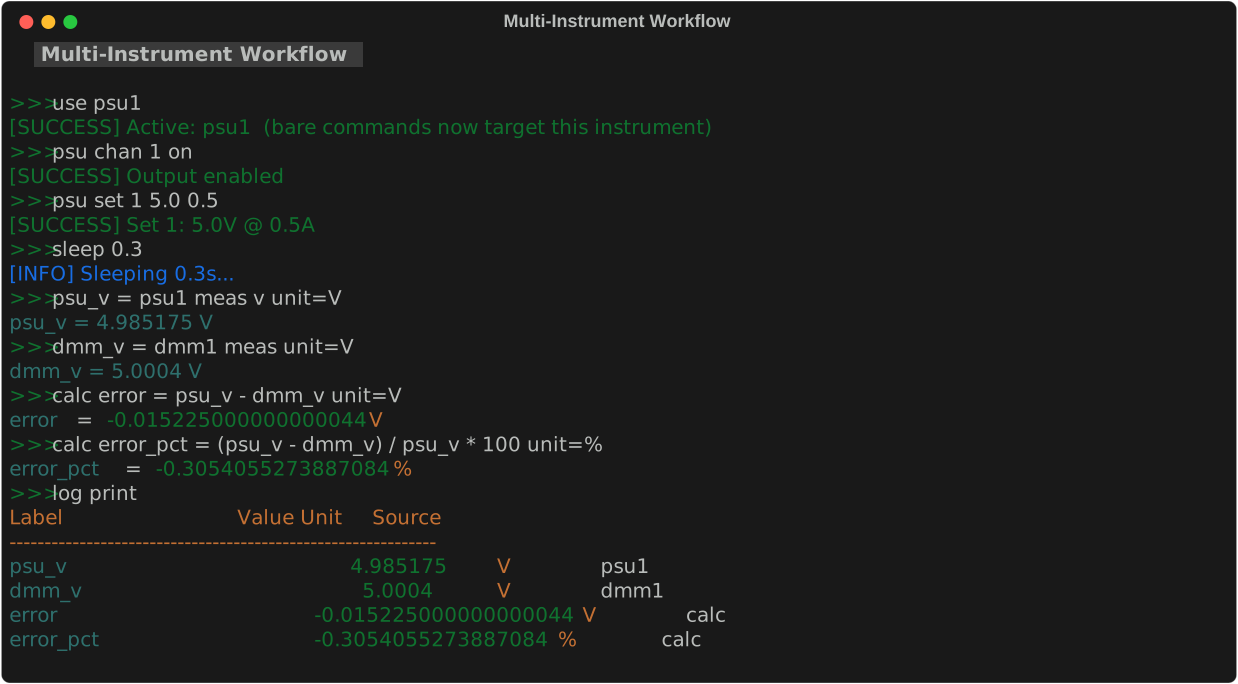
Finding and running examples
The REPL ships with 15+ example scripts covering PSU+DMM sweeps, scope captures, and full lab-report workflows. All examples work in Mock Mode, so you can practice without hardware.
1. List what's available
Prints every bundled example with a one-line description. Use this as a menu.
2. Load an example into your session
examples load <name> saves the script under that name in your session so it can be inspected, edited, or run. To preview the source, use script show <name>. To pull every bundled example in at once, run examples load all.
3. Run it (with optional parameter overrides)
Each example declares parameters at the top (e.g. voltage = 5.0). Override any of them from the command line with name=value pairs. The REPL substitutes them before execution -- nothing else changes.
4. Walkthrough: psu_dmm_test
This is the simplest useful workflow:
> examples load psu_dmm_test
loaded: psu_dmm_test
> script run psu_dmm_test voltage=5.0 label=vtest
=== PSU/DMM Voltage Test ===
Target: 5.0V
psu_v = 4.998 V
vtest = 4.997 V
done.
It turns on PSU channel 1, sets the voltage, waits 500 ms for settling, records the PSU's own readback, then takes a DMM reading -- all logged for log save.
5. Modify and save your own
After examples load, the script is in your session. Edit it with script edit <name>, save under a new name with script save <new_name>, and re-run with script run <new_name>. Custom scripts live in your local user scripts directory and persist across sessions.
examples                        # list all bundled examples
examples load <name>            # load a specific example
examples load all               # load all examples at once
script show <name>              # preview source
script run <name> [k=v ...]     # run with parameter overrides
script edit <name>              # open in $EDITOR
script save <new_name>          # save current script under a new name
psu_dmm_test
Set PSU to a voltage, measure with DMM, log result.
This is the simplest useful workflow: power a DUT at a target voltage and record what the DMM actually measures.
Parameters:
| Parameter | Default | Description |
|---|---|---|
voltage |
5.0 |
Target PSU voltage in volts. |
label |
vtest |
Label for the DMM measurement in the log. |
Load and run:
examples load psu_dmm_test
script run psu_dmm_test voltage=5.0 label=vtest
script run psu_dmm_test voltage=3.3 label=v3v3
What it does:
- Turns on PSU channel 1
- Sets the voltage to
{voltage}V - Waits 500 ms for the output to settle
- Records the PSU's measured output as
psu_v - Takes a DC voltage reading from the DMM, records as
{label} - Prints the log
Script source:
# psu_dmm_test
voltage = 5.0
label = vtest

print "=== PSU/DMM Voltage Test ==="
print "Target: {voltage}V"

psu1 chan 1 on
psu1 set 1 {voltage}
sleep 0.5

psu_v = psu1 meas v unit=V

dmm1 config vdc
{label} = dmm1 meas unit=V

print "=== Test complete ==="
log print
Interpreting results:
After running, log print shows:
Compute the error between PSU setpoint and DMM reading:
voltage_sweep
Sweep PSU through a list of voltages, log DMM reading at each step.
Tests how a DUT responds across a range of supply voltages.
Load and run:
What it does:
- Turns on PSU channel 1
- For each voltage in the list: sets PSU → waits 500 ms → records DMM reading
- Turns off PSU
- Prints and saves the log to
voltage_sweep.csv
Default voltage list: 1.0 2.0 3.3 5.0 9.0 12.0
To change the voltage list: load the example, then script edit voltage_sweep and modify the for line.
Script source:
# voltage_sweep
print "=== Voltage Sweep ==="
psu1 chan 1 on
sleep 0.3
dmm1 config vdc

for v 1.0 2.0 3.3 5.0 9.0 12.0
  print "Setting {v}V..."
  psu1 set 1 {v}
  sleep 0.5
  v_{v} = dmm1 meas unit=V
end

psu1 chan 1 off
print "=== Sweep complete ==="
log print
log save voltage_sweep.csv
Analyzing results:
After running, each voltage step is recorded as v_1.0, v_2.0, v_3.3, etc. You can compute differences:
awg_scope_check
Output a sine wave on AWG ch1, measure frequency and PK2PK on the scope.
A basic signal integrity check — verify the AWG is outputting what you expect.
Parameters:
| Parameter | Default | Description |
|---|---|---|
freq |
1000 |
Target frequency in Hz. |
amp |
2.0 |
Target amplitude in Vpp. |
Load and run:
examples load awg_scope_check
script run awg_scope_check freq=1000 amp=2.0
script run awg_scope_check freq=10000 amp=1.0
What it does:
- Enables AWG channel 1
- Configures a sine wave at
{freq}Hz,{amp}Vpp - Waits 500 ms for signal to stabilize
- Runs
scope autosetto auto-configure the scope - Waits 1 s for autoset to settle
- Records: frequency measurement from the scope
Script source:
# awg_scope_check
freq = 1000
amp = 2.0

print "=== AWG + Scope Signal Check ==="
print "Frequency: {freq} Hz   Amplitude: {amp} Vpp"

awg1 chan 1 on
awg1 wave 1 sine freq={freq} amp={amp} offset=0
sleep 0.5

scope1 autoset
sleep 1.0

meas_freq = scope1 meas 1 FREQUENCY unit=Hz

print "=== Results ==="
log print
Check accuracy:
freq_sweep
Sweep AWG through a list of frequencies, scope measures each.
Characterize frequency response — useful for testing filters, amplifiers, and signal paths.
Load and run:
What it does:
- Enables AWG ch1, sets sine wave with fixed amplitude
- For each frequency in the list: sets frequency → waits 400 ms → records scope measurement
- Disables AWG
- Prints and saves log to
freq_sweep.csv
Default frequency list: 100 500 1000 5000 10000 50000 100000 (Hz)
Script source:
# freq_sweep
print "=== Frequency Sweep ==="
awg1 chan 1 on
awg1 wave 1 sine amp=2.0 offset=0
sleep 0.3

for f 100 500 1000 5000 10000 50000 100000
  print "Testing {f} Hz..."
  awg1 freq 1 {f}
  sleep 0.4
  freq_{f} = scope1 meas 1 FREQUENCY unit=Hz
end

awg1 chan 1 off
print "=== Sweep complete ==="
log print
log save freq_sweep.csv
Computing gain:
If you're testing a filter or amplifier, measure the input and output simultaneously:
# Modify the loop to capture both channels:
for f 100 500 1000 5000 10000 50000
  awg1 freq 1 {f}
  sleep 0.4
  in_{f} = scope1 meas 1 PK2PK unit=V
  out_{f} = scope1 meas 2 PK2PK unit=V
  calc gain_{f} {out_{f}} / {in_{f}}
end
psu_ramp
Ramp PSU voltage from start to end in N equal steps.
Useful for gradually bringing up power to a DUT and logging the response at each step.
Parameters:
| Parameter | Default | Description |
|---|---|---|
v_start |
0 |
Starting voltage. |
v_end |
12.0 |
Ending voltage. |
steps |
7 |
Number of steps (informational — edit the for line to change the actual list). |
delay |
0.5 |
Seconds to wait at each step. |
Load and run:
Script source:
# psu_ramp
v_start = 0
v_end = 12.0
steps = 7
delay = 0.5

print "=== PSU Voltage Ramp ==="
print "{v_start}V -> {v_end}V in {steps} steps"

psu1 chan 1 on

for v {v_start} 2.0 4.0 6.0 8.0 10.0 {v_end}
  print "Ramping to {v}V"
  psu1 set 1 {v}
  sleep {delay}
  ramp_{v} = psu1 meas v unit=V
end

print "=== Ramp complete ==="
log print
Customizing the step list
The for loop hardcodes the voltage steps (2.0 4.0 6.0 ...). To change the actual step values, load the example with examples load psu_ramp, then script edit psu_ramp and modify the for line directly.
Live Plot Examples
These examples use liveplot to visualize data in real time as it's collected. All work with --mock. See Plotting for full details on the plotting system.
Every example below has both a .scpi and .py version. Run the .scpi file with run <path> in the REPL, or the .py file with python <path>.
live_voltage_sweep
Sweep PSU voltages with a live plot tracking DMM readings.
Uses linspace to generate 51 evenly-spaced voltage steps from 0.5 V to 12 V.
The live plot shows DMM readings appearing point-by-point as the sweep progresses.
Script source:
# live_voltage_sweep
# Sweeps PSU through voltages while a live plot shows DMM measurements
# in real time.  Works with --mock.

print "=== Live Voltage Sweep ==="

# Start live plot BEFORE collecting data
liveplot dmm_* --title "Voltage Sweep" --xlabel "Time (s)" --ylabel "Voltage (V)"

psu1 chan 1 on
dmm1 config vdc
sleep 0.3

# Use linspace for many points so the plot updates visibly
sweep_voltages = linspace 0.5 12.0 50
for v {sweep_voltages}
  print "Setting {v}V..."
  psu1 set 1 {v}
  sleep 200ms
  dmm_{v}V = dmm1 meas unit=V
end

psu1 chan 1 off
print "=== Sweep complete ==="
log print
live_multi_plot
Two live plots: PSU voltage + current during a ramp.
Opens two separate tabs — one for voltage, one for current — by running two liveplot commands.
Script source:
# live_multi_plot
# Opens two independent live plots -- one for voltage, one for current.
# Watch both update in real time as the PSU ramps.  Works with --mock.

print "=== Multi-Plot PSU Ramp ==="

# Open two live plots (each gets its own tab)
liveplot psu_v_* --title "PSU Voltage" --xlabel "Time (s)" --ylabel "Voltage (V)"
liveplot psu_i_* --title "PSU Current" --xlabel "Time (s)" --ylabel "Current (A)"

psu1 chan 1 on
sleep 0.3

ramp_voltages = linspace 0.5 12.0 50
for v {ramp_voltages}
  print "Ramping to {v}V..."
  psu1 set 1 {v}
  sleep 250ms
  psu_v_{v} = psu1 meas v unit=V
  psu_i_{v} = psu1 meas i unit=A
end

psu1 chan 1 off
print "=== Ramp complete ==="
log print
live_combined_plot
PSU voltage + current overlaid on ONE chart.
Same data as live_multi_plot, but uses a single liveplot command with two glob patterns to overlay both series on one chart.
Script source:
# live_combined_plot
# Plots voltage AND current as two series on a single chart.
# Multiple glob patterns on one liveplot = multiple series, one chart.
# Works with --mock.

print "=== Combined V+I Live Plot ==="

# Two patterns on ONE liveplot = two series on one chart
liveplot psu_v_* psu_i_* --title "PSU Voltage & Current" --xlabel "Time (s)"

psu1 chan 1 on
sleep 0.3

ramp_voltages = linspace 0.5 12.0 50
for v {ramp_voltages}
  print "Ramping to {v}V..."
  psu1 set 1 {v}
  sleep 200ms
  psu_v_{v} = psu1 meas v unit=V
  psu_i_{v} = psu1 meas i unit=A
end

psu1 chan 1 off
print "=== Ramp complete ==="
log print
The key difference:
# Two tabs (live_multi_plot):
liveplot psu_v_* --title "Voltage"
liveplot psu_i_* --title "Current"

# One chart, two series (live_combined_plot):
liveplot psu_v_* psu_i_* --title "PSU Voltage & Current"
live_freq_sweep
Live plot of scope frequency measurements during AWG sweep.
Sweeps AWG through 16 frequencies from 100 Hz to 100 kHz.
Script source:
# live_freq_sweep
# Sweeps AWG frequencies while a live plot tracks scope measurements.
# Works with --mock.

print "=== Live Frequency Sweep ==="

liveplot freq_* --title "Frequency Response" --xlabel "Time (s)" --ylabel "Frequency (Hz)"

awg1 chan 1 on
awg1 wave 1 sine amp=2.0 offset=0
sleep 0.3

for f 100 200 500 750 1000 2000 3000 5000 7500 10000 15000 20000 30000 50000 75000 100000
  print "Testing {f} Hz..."
  awg1 freq 1 {f}
  sleep 250ms
  freq_{f} = scope1 meas 1 FREQUENCY unit=Hz
end

awg1 chan 1 off
print "=== Sweep complete ==="
log print
Scripting & Control Flow Examples
These examples demonstrate the REPL's control flow features: conditionals, loops, assertions, and cross-script Python interop. All work with --mock.
conditional_psu_check
if/elif/else: check PSU voltage is in range and print status.
Script source:
# conditional_psu_check
# Demonstrates if/elif/else conditional branching.
# Works in --mock mode (mock PSU returns ~5.0 V).

psu1 chan 1 on
psu1 set 1 5.0
sleep 0.3
psu_v = psu1 meas v unit=V

if psu_v > 5.1
  print "[WARN] Overvoltage: {psu_v} V"
elif psu_v < 4.9
  print "[WARN] Undervoltage: {psu_v} V"
else
  print "[PASS] Voltage in range: {psu_v} V"
end

psu1 chan 1 off
assert_limits
assert: verify PSU voltage is within hard safety bounds.
Script source:
# assert_limits
# Demonstrates assert statements for safety-limit checking.
# Works in --mock mode (mock PSU returns ~5.0 V).

upper_limit psu1 voltage 5.5
psu1 chan 1 on
psu1 set 1 5.0
sleep 0.3
v = psu1 meas v unit=V

assert v > 0.0 "Voltage must be positive"
assert v < 6.0 "Voltage must be below 6 V"
print "[PASS] Assertions passed — measured {v} V"

psu1 chan 1 off
while_counter
while: take 5 PSU voltage samples with a counter and compute average.
Script source:
# while_counter
# Demonstrates while loop with += counter and average calculation.
# Works in --mock mode (mock PSU returns ~5.0 V).

count = 0
total = 0.0
psu1 chan 1 on
psu1 set 1 5.0
sleep 0.2

while count < 5
  count += 1
  sample = psu1 meas v unit=V
  total = total + sample
  print "Sample {count}: {sample} V"
  sleep 100ms
end

avg = total / count unit=V
print "Average over {count} samples: {avg} V"
psu1 chan 1 off
log print
syntax_reference
Full syntax tour: variables, calc, if/elif/else, while, assert, check, boolean ops.
Script source:
# syntax_reference
# A complete tour of all REPL scripting features.
# Works in --mock mode -- no real instruments required.

# -- Variables & expressions --
x = 10
y = 3
z = x * y + 1          # arithmetic: z = 31
name = "voltage"        # string assignment
ratio = x / y          # float division
bits = 0xFF & 0x0F     # bitwise AND
shifted = 1 << 4       # left shift: 16

# -- Augmented assignment & increment/decrement --
count = 0
count += 1             # count = 1
count += 1             # count = 2
count -= 1             # count = 1
count++                # count = 2
count--                # count = 1
print "count = {count}"

# -- Ternary expression --
label = x > 5 if x > 5 else 0  # ternary: 10 > 5 → True
category = 10 if x > 5 else 0  # proper ternary: 10
print "category = {category}"

# -- Math functions & constants --
sq = sqrt(x)           # sqrt(10)
lg = log10(1000)       # 3.0
angle = degrees(pi)    # 180.0
print "sqrt(10) = {sq}  log10(1000) = {lg}  180deg = {angle}"

# -- Computed assignment with unit logging --
a = 5.0
b = 2.0
power = a * b unit=W   # power stored in log with unit W
error_pct = (a - b) / b * 100 unit=%
print "power = {power} W   error_pct = {error_pct} %"

# -- calc keyword (alternative form) --
calc gain = a / b      # equivalent to: gain = a / b
print "gain = {gain}"

# -- if / elif / else --
voltage = 5.05
if voltage > 5.1
  verdict = "OVER"
elif voltage < 4.9
  verdict = "UNDER"
else
  verdict = "OK"
end
print "Voltage {voltage} V → {verdict}"

# -- assert (hard stop -- script aborts on failure) --
assert voltage > 0.0 "voltage must be positive"
assert voltage < 6.0 "voltage below safety limit"
print "[PASS] Both asserts passed"

# -- check (soft -- records PASS/FAIL, continues) --
check voltage > 4.9 "above lower bound"
check voltage < 5.1 "below upper bound"
check voltage > 100 "this will fail but script continues"

# -- while loop --
i = 0
total = 0
while i < 5
  i += 1
  total += i
  print "  iter {i}: total = {total}"
end
print "Sum 1..5 = {total}"

# -- while with break/continue --
j = 0
while j < 20
  j++
  if j == 3
    continue           # skip 3
  end
  if j > 6
    break              # stop at 6
  end
end
print "j stopped at {j}"

# -- for loop --
for v 1.0 2.0 3.3 5.0
  print "  for: v = {v}"
end

# -- Boolean operators (and / or / not / && / ||) --
ok = voltage > 4.9 and voltage < 5.1
also_ok = voltage > 4.9 && voltage < 5.1  # && is alias for and
print "In spec (and): {ok}  In spec (&&): {also_ok}"

# -- log report (shows check results) --
log report
log print
cross_script_demo
Single SCPI script that collects data then calls Python for analysis.
Script source:
# cross_script_demo
# Collects PSU/DMM measurements, then calls Python inline for analysis.
# REPL variables are auto-injected into the Python script as native types.
# Works with --mock.

print "=== Cross-Script Demo ==="

target = 5.0
tolerance = 0.05

psu1 chan 1 on
dmm1 config vdc
psu1 set 1 {target}
sleep 0.3

# Collect 10 readings at the target voltage
for i 1 2 3 4 5 6 7 8 9 10
  reading_{i} = dmm1 meas unit=V
  sleep 100ms
end

psu_v = psu1 meas v unit=V
psu1 chan 1 off

# Call Python for analysis -- target, tolerance, psu_v are auto-available
python cross_script_demo.py

log print
print "Analysis complete. See variables: mean_v, std_dev, error_pct"
complete_cross_script
Comprehensive showcase: every instrument, loop, syntax feature, and all 20 Python/SCPI interop patterns.
Script source:
# complete_cross_script
# Comprehensive REPL feature showcase.
# Demonstrates EVERY scripting feature, instrument command,
# and all 10 SCPI-context Python interop patterns (1-10).
#
# Run with: examples load complete_cross_script
#           script run complete_cross_script
#
# Then run the Python analysis phase:
#   python examples/Cross Script/complete_cross_script.py
#
# Works with --mock mode.
#
# Full source: examples/Cross Script/complete_cross_script.scpi

print "=== Complete Cross Script — REPL Feature Showcase ==="

# -- Setup --
set +e
target = 5.0
tolerance = 0.05

# -- PSU sweep with glob-friendly labels --
psu1 chan 1 on
for v 1.0 2.0 3.3 5.0 9.0 12.0
  psu1 set 1 {v}
  sleep 100ms
  psu_sweep_{v} = psu1 meas v unit=V
end
psu1 chan 1 off

# -- DMM readings in a loop (glob: dmm_reading_*) --
dmm1 config vdc
for i 1 2 3 4 5
  dmm_reading_{i} = dmm1 meas unit=V
  sleep 50ms
end

# -- Glob pattern plots --
plot psu_sweep_* --title "PSU Sweep"
plot dmm_reading_* --title "DMM Readings"

# -- Python interop patterns (1, 3, 5, 7, 9 shown inline) --

# PATTERN 1: pyeval inline
pyeval 6 * 7
print "Pattern 1: 6*7 = {_}"

# PATTERN 3: pyeval in a loop
for n 1 2 3
  pyeval {n} ** 2
  print "  {n}^2 = {_}"
end

# PATTERN 5: SCPI var read by pyeval
scpi_greeting = hello_world
pyeval vars['scpi_greeting'].upper()
print "Pattern 5: {_}"

# PATTERN 7: SCPI var modified by pyeval
modify_me = 10
pyeval float(vars['modify_me']) * 3 + 7
modify_me = {_}
print "Pattern 7: modify_me = {modify_me}"

# PATTERN 9: pyeval creates value for SCPI
pyeval 2 ** 10
pyeval_result = {_}
print "Pattern 9: pyeval_result = {pyeval_result}"

# Patterns 2, 4, 6, 8, 10 require helper file --
# see full script: examples/Cross Script/complete_cross_script.scpi

log print
print "=== SCPI phase complete ==="
Building your own
Use these examples as templates. The general pattern for any measurement script is:
# 1. Set defaults (overridable at run time)
voltage = 5.0
label = my_test
delay = 0.5

# 2. Operator setup
print "=== My Test ==="
pause Connect hardware, then press Enter

# 3. Configure instruments
psu1 chan 1 on
psu1 set 1 {voltage}
sleep {delay}

# 4. Measure and store
psu_out = psu1 meas v unit=V
dmm1 config vdc
dmm_out = dmm1 meas unit=V

# 5. Derived calculations
calc error {dmm_out} - {psu_out} unit=V

# 6. Export
log print
log save {label}_results.csv

# 7. Safe state
psu1 chan 1 off
See Scripting for the complete directive reference.