DMM — Multimeter
Auto-generated reference
For the definitive command list extracted directly from source code, see REPL Command Reference.
Controls digital multimeters.
- Multiple DMMs are named
dmm1,dmm2, etc. - Typical workflow: configure mode -> take readings -> store results
- Or use
dmm measfor a one-shot measurement without a separate configure step
6½-digit multimeter with GPIB interface. Supports NPLC control, display text, fetch, and high-accuracy measurements.
5½-digit multimeter with USB/LAN interface. Supports capacitance, temperature, dual display, and resolution speed control (SLOW/MEDIUM/FAST). Does not support NPLC.
4½-digit multimeter with USB/serial interface. Supports basic DMM commands.
dmm config
Configure the measurement mode. The mode stays active until changed.
Note
dmm mode is an alias for dmm config — both are identical.
| Parameter | Required | Values | Description |
|---|---|---|---|
mode |
required | see below | What to measure. |
range |
optional | float, DEF, MIN, MAX |
Measurement range (e.g. 10 for 10 V range). DEF = auto-range. |
resolution |
optional | float, DEF, MIN, MAX |
Resolution (number of significant digits). DEF = default. |
nplc= |
optional | 0.02, 0.2, 1, 10, 100 |
Integration time in power line cycles. Higher = slower but lower noise. HP 34401A only, DC modes only. |
Measurement modes:
| Mode | Measures |
|---|---|
vdc |
DC voltage |
vac |
AC voltage (RMS) |
idc |
DC current |
iac |
AC current (RMS) |
res |
Resistance, 2-wire |
fres |
Resistance, 4-wire (Kelvin) |
freq |
Frequency |
per |
Period |
cont |
Continuity |
diode |
Diode forward voltage |
cap |
Capacitance (device-dependent) |
temp |
Temperature (device-dependent) |
dmm config vdc                    # DC voltage, auto-range
dmm config vdc 10                 # DC voltage, 10 V range
dmm config vdc 10 DEF nplc=10    # high-accuracy DC voltage (slow)
dmm config res                    # 2-wire resistance, auto-range
dmm config fres DEF DEF nplc=1   # 4-wire resistance, 1 PLC
dmm config freq                   # frequency measurement
Tip
For a single quick reading, use dmm meas instead — it configures and reads in one step.
dmm read
Take a reading using the currently configured mode.
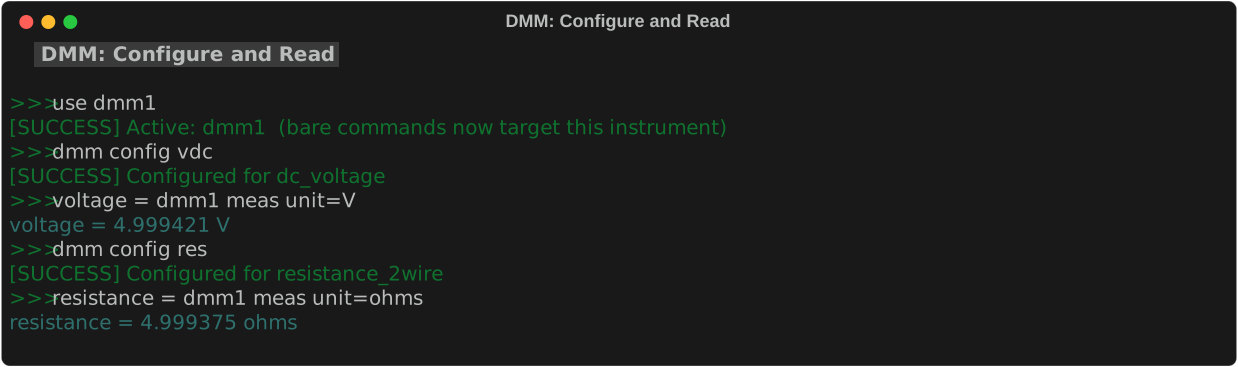
Call dmm config first to set the mode. dmm read does not store the result — use the assignment syntax (label = dmm meas unit=V) to record it.
dmm meas
One-shot measurement — configure and read in a single command.
| Parameter | Required | Values | Description |
|---|---|---|---|
mode |
required | same as dmm config |
Measurement mode. |
range |
optional | float or DEF |
Measurement range. Default: auto-range. |
resolution |
optional | float or DEF |
Resolution. Default: default. |
dmm meas vdc        # quick DC voltage reading
dmm meas res        # quick resistance reading
dmm meas freq       # quick frequency reading
Note
dmm meas does not support nplc= or storing results. For high-accuracy or repeated measurements, use dmm config + dmm read or the assignment syntax (label = dmm meas unit=V).
Recording measurements
Use assignment syntax to measure and store the result to the measurement log in one step:
| Parameter | Required | Values | Description |
|---|---|---|---|
label |
required | string, no spaces | Name for this entry in the log. Appears as the row identifier in log print output. Also used as the bare variable name in calc expressions. Use underscores instead of spaces — e.g. vout_mv. |
scale= |
optional | float | Multiply the raw reading by this factor before storing. Useful for unit conversion — e.g. scale=1000 to convert V → mV, or scale=0.001 to convert mA → A. Default: 1.0 (no scaling). |
unit= |
optional | string | Unit label shown in log print output (e.g. V, mV, A, Ω). Display-only — does not affect the stored value or calculations. |
Requires dmm config first
Call dmm config <mode> before using the assignment syntax. The DMM must be in the correct mode.
dmm config vdc
vout = dmm meas unit=V                  # store as 'vout', use as bare name in calc

dmm config res
r_load = dmm meas unit=Ω               # store resistance

dmm config vdc
vout_mv = dmm meas scale=1000 unit=mV  # convert V → mV before storing
Using stored values in calculations:
dmm config vdc
voltage = dmm meas unit=V

dmm config idc
current = dmm meas unit=A

calc power voltage * current unit=W    # compute power
log print
See Log & Calc for full details.
dmm fetch
Fetch the last reading without triggering a new measurement.
Returns the most recent measurement result without re-triggering. HP 34401A only.
dmm beep
Trigger an audible beep from the DMM.
Useful as audio confirmation during scripted tests — e.g. beep when a measurement is complete.
dmm display
Control the front panel display.
| Parameter | Required | Values | Description |
|---|---|---|---|
on\|off |
required | on, off |
Turn the display on or off. |
dmm display off    # blank the display (speeds up measurements on HP 34401A)
dmm display on     # restore display
dmm text
Show custom text on the DMM display.
| Parameter | Required | Values | Description |
|---|---|---|---|
message |
required | string | Text to show on the front panel. |
scroll= |
optional | auto, on, off |
Scroll behavior for messages wider than the display. auto = scroll only if too wide. |
delay= |
optional | float (s) | Delay between scroll steps in seconds. |
loops= |
optional | int | Number of times to repeat the scroll animation. |
Note
HP 34401A only.
dmm text_loop
Scroll text continuously across the DMM display in a background loop. Use this for long messages that don't fit on the 12-character display, or for unattended display status — contrast with dmm text which sets a static one-shot message.
Start scrolling
| Parameter | Required | Values | Description |
|---|---|---|---|
message |
required | string | Text to scroll. |
delay= |
optional | float (s) | Seconds between scroll steps. Default: 0.2. |
pad= |
optional | int | Blank characters to pad each side of the message. Default: 4 (the HP 34401A display is 12 characters wide). |
width= |
optional | int | Display window width in characters. Default: 12. |
Stop scrolling
Stops the scrolling loop and clears the display.
Note
HP 34401A only. The loop runs until dmm text_loop off is called or the REPL exits.
Edge cases
- Calling
dmm text_loopwhile a loop is already running replaces the existing loop immediately. - Empty messages scroll blank padding across the display.
- If
pad + message length > width, the message wraps naturally as the scroll window advances.
dmm cleartext
Clear any custom text from the DMM display and restore the measurement display.
Clears text set by either dmm text or dmm text_loop. If a scrolling loop is active, stop it first with dmm text_loop off before calling dmm cleartext. Calling dmm cleartext when no custom text is displayed is a no-op.
Note
HP 34401A only. See also: dmm text, dmm text_loop.
dmm ranges
Print the valid measurement ranges for the connected DMM model.
Note
dmm limits is an alias for dmm ranges.
dmm state
| Value | Effect |
|---|---|
safe |
Returns to safe defaults |
reset |
*RST — factory defaults |
Tips & Gotchas
Per-model quirks that trip students up most often.
HP 34401A
- NPLC setting matters. Integration time (power line cycles) directly affects accuracy and speed:
nplc=0.02-- fast but noisy (50 readings/second)nplc=1-- good balance (default)nplc=10-- high accuracy, slow (about 0.5 seconds per reading)nplc=100-- maximum accuracy, very slow (about 2 seconds per reading)- Display blanking.
dmm display offspeeds up measurements by ~10% on GPIB. - Auto-range settling. When auto-ranging, the first reading after a range change may be inaccurate. Take a throwaway reading first.
- GPIB address. Default is usually address 22. Check the front panel under Utility > Remote Interface.
Keysight EDU34450A
- No NPLC support. Uses SLOW/MEDIUM/FAST speed settings instead.
- Capacitance and temperature modes. Supported but not on all HP models -- check before using.
- Dual display. Can show two measurements simultaneously on the front panel, but the REPL reads only the primary display.
OWON XDM1041
- 4.5 digits. Lower resolution than the HP 34401A (6.5 digits). Expect more noise in readings.
- Limited modes. Does not support NPLC, display text, or fetch.
General DMM tips
- Configure the DMM mode before measuring. The most common mistake is measuring without setting the correct mode (
vdc,idc,res, etc.).