Architecture — Layers of Abstraction
This page shows how the toolkit is layered, from hardware at the center out to the various user-facing frontends.
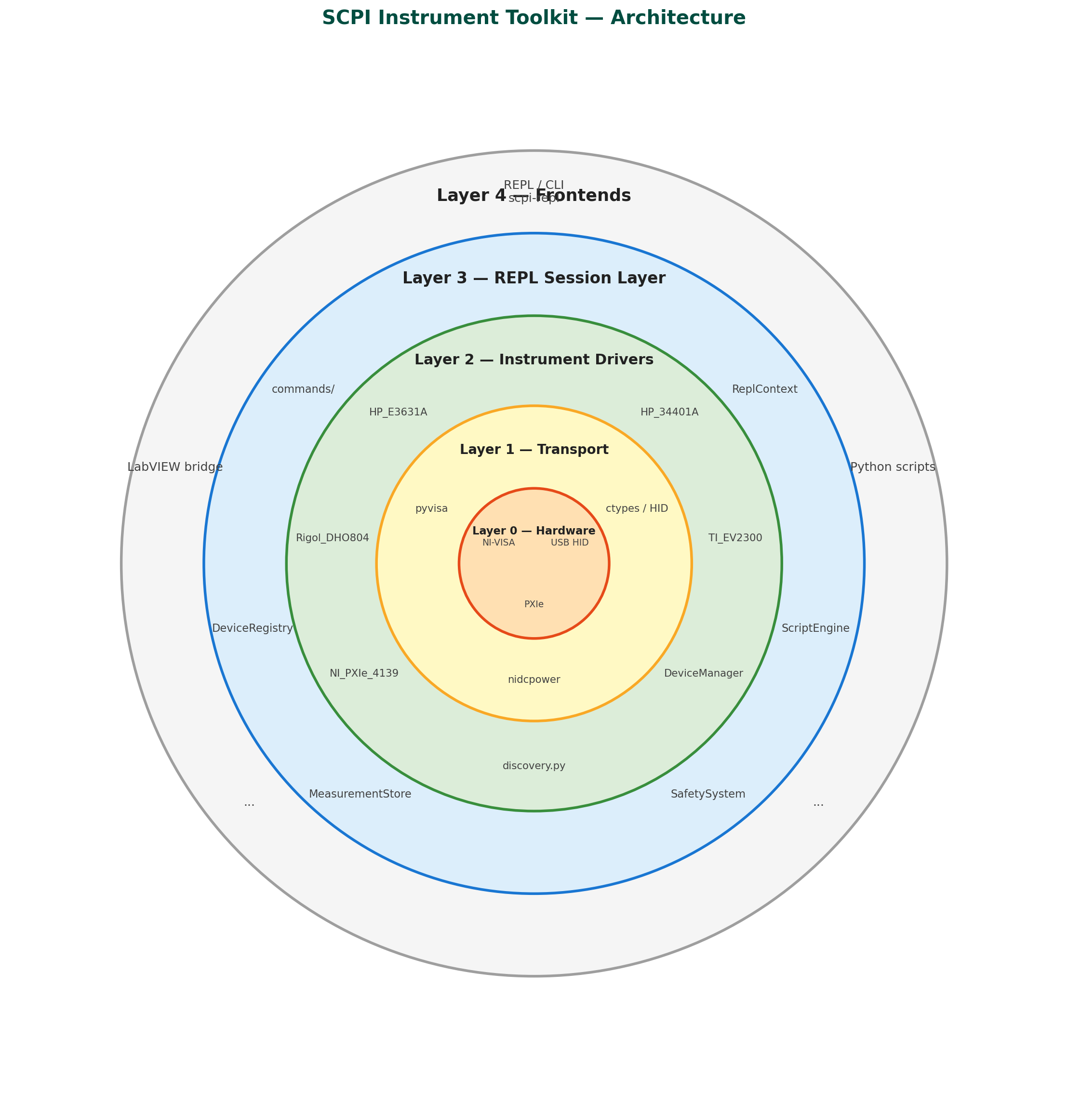
Layer-by-layer breakdown
Layer 0 — Hardware & OS interfaces
The physical instruments and the OS-level drivers that expose them:
| Interface | Used by | Notes |
|---|---|---|
| NI-VISA / USBTMC | SCPI instruments | USB, GPIB, Serial |
/dev/hidrawN (Linux) / hid.dll (Windows) |
TI EV2300 | Raw HID, no VISA needed |
| NI-DCPower runtime | NI PXIe-4139 | PXIe chassis, proprietary SDK |
Layer 1 — Transport libraries
Python packages that talk to the OS interfaces:
| Library | Role |
|---|---|
pyvisa |
Unified VISA session management — open, write, query, close |
ctypes + OS HID APIs |
Low-level byte I/O for the EV2300 (no pip install needed) |
nidcpower |
NI's official Python SDK for the PXIe-4139 SMU |
Layer 2 — Driver layer (lab_instruments/src/)
One class per instrument model. Two families:
SCPI drivers inherit DeviceManager (which wraps a pyvisa.Resource) and speak the SCPI command set. Every public method is a named operation: set_voltage, measure_current, enable_output, etc.
Non-SCPI drivers own their own transport:
TI_EV2300— HID protocol overctypes/hidraw, noDeviceManagerNI_PXIe_4139—nidcpowersession, noDeviceManager
DeviceManager (base class) handles connect/disconnect/query/write.
discovery.py probes all VISA addresses, identifies models by *IDN?, and returns named instances (psu1, dmm1, …).
mock_instruments.py provides in-process fakes for testing without hardware.
Layer 3 — REPL layer (lab_instruments/repl/)
Sits on top of the driver layer and adds interactive-session state:
| Component | Role |
|---|---|
ReplContext / DeviceRegistry |
Holds the live instrument map (psu1 → HP_E3631A instance) and active selection |
commands/ |
One file per instrument family — parses text args and calls driver methods |
ScriptEngine |
Loops, variables, for/while, repeat, if directives |
MeasurementStore |
Labelled measurement log, CSV export, calc expressions |
SafetySystem |
Voltage/current limits, interlock checks before writes |
Layer 4 — Frontends
All three frontends consume the driver layer (Layer 2) directly or via the REPL layer (Layer 3):
| Frontend | Entry point | Uses |
|---|---|---|
REPL / CLI (scpi-repl) |
shell.py → cmd.Cmd loop |
Layer 3 (commands) |
| LabVIEW bridge | labview_bridge.py |
Layer 3 — flat module-level functions that invoke REPL commands, LabVIEW-compatible types |
| Python scripts | from lab_instruments.src import ... |
Layer 2 directly |
What bypasses what
- The LabVIEW bridge goes through Layer 3 — it exposes flat module-level functions that LabVIEW's Python Node can call with primitive types, and those functions invoke the same REPL command handlers. This means instrument logic, safety checks, and scripting stay in one place.
- The EV2300 and NI PXIe-4139 are optional imports everywhere — missing hardware or missing SDK produces a clean
ImportErrorfallback, not a crash. - Mocks live at Layer 2 and replace real driver instances, so Layers 3 and 4 are fully testable without hardware.