PSU — Power Supply
Auto-generated reference
For the definitive command list extracted directly from source code, see REPL Command Reference.
Controls power supply units over VISA.
- Single-channel PSUs (e.g. HP E3631A): channel is always
1 - Multi-channel PSUs (e.g. Matrix MPS-6010H): channels
1,2,3, orall - Multiple PSUs are named
psu1,psu2, etc.
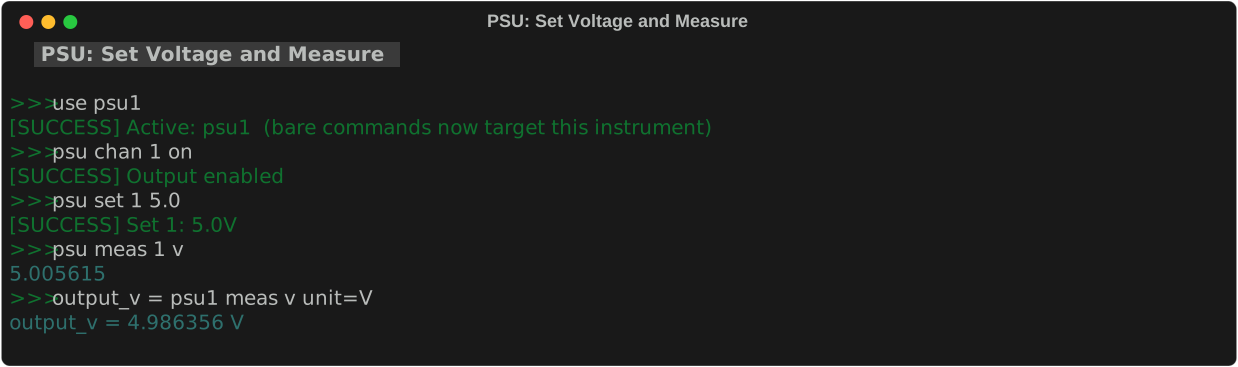
Address a specific PSU directly: psu1 set 5.0 -- or use use psu1 then psu set 5.0.
Triple-output power supply. Channels: 1 (0–6 V), 2 (0–25 V), 3 (0– −25 V). Supports tracking mode for ±supply configurations.
Triple-output power supply. Channels: 1 (0–6 V / 5 A), 2 (0–30 V / 1 A), 3 (0–30 V / 1 A). USB/LAN interface. Supports tracking mode, OVP/OCP protection, save/recall (5 slots).
Single-channel programmable PSU with serial interface. Supports remote mode control.
psu chan
Enable or disable an output channel.
| Parameter | Required | Values | Description |
|---|---|---|---|
channel |
multi-ch only | 1, 2, 3, all |
Channel number. Omit entirely for single-channel PSUs. Use all to toggle all channels at once. |
on\|off |
required | on, off |
on = enable output voltage; off = disable output. |
psu chan on          # enable output (single-channel PSU)
psu chan off         # disable output (single-channel PSU)
psu chan 2 off       # disable channel 2 (multi-channel PSU)
psu chan all off     # disable all channels at once
psu set
Set output voltage and optional current limit. Channel is always required.
| Parameter | Required | Values | Description |
|---|---|---|---|
channel |
required | 1, 2, 3 |
Channel number. Single-channel PSUs use 1. |
voltage |
required | float (V) | Target output voltage in volts. |
current |
optional | float (A) | Current limit in amperes. If omitted, the current limit is unchanged. |
psu set 1 5.0             # channel 1 to 5 V
psu set 1 5.0 0.5         # channel 1: 5 V, 0.5 A limit
psu set 2 12.0            # channel 2 to 12 V
psu set 2 12.0 1.0        # channel 2: 12 V, 1 A limit
psu meas
Measure and print the live output value. Channel is always required.
| Parameter | Required | Values | Description |
|---|---|---|---|
channel |
required | 1, 2, 3 |
Channel to measure. Single-channel PSUs use 1. |
v\|i |
required | v, i |
v = measure output voltage; i = measure output current. |
Note
psu meas prints the value but does not record it. To record for export or calculations, use the assignment syntax: label = psu meas 1 v unit=V.
Recording measurements
Use assignment syntax to measure and store the result to the measurement log in one step:
| Parameter | Required | Values | Description |
|---|---|---|---|
label |
required | string, no spaces | Name for this entry in the log. Appears as the row identifier in log print output. Also used as the bare variable name in calc expressions. Use underscores instead of spaces — e.g. ch1_voltage. |
channel |
required | 1, 2, 3 |
Channel to measure. Single-channel PSUs use 1. |
v\|i |
required | v, i |
Quantity to measure: v = voltage, i = current. |
unit= |
optional | string | Unit label shown in log print output (e.g. V, A). Display-only — does not affect the stored numeric value or any calculation. |
ch1_v = psu meas 1 v unit=V       # store channel 1 voltage
ch1_i = psu meas 1 i unit=A       # store channel 1 current
ch2_v = psu meas 2 v unit=V       # store channel 2 voltage
After storing, view with log print or compute derived values with calc:
psu_v = psu meas 1 v unit=V
psu_i = psu meas 1 i unit=A
calc power psu_v * psu_i unit=W    # compute power
log print
See Log & Calc for full details.
psu get
Show the programmed voltage/current setpoints (not the live measured output).
For live measured values use psu meas.
psu track
Enable or disable channel tracking mode (multi-channel PSUs only).
| Parameter | Required | Description |
|---|---|---|
on\|off |
required | on = link channels in tracking mode (±supply); off = independent control. |
In tracking mode the two adjustable channels mirror each other — one outputs positive, the other negative — for split-supply configurations.
psu save / recall
Save or restore voltage/current settings to a numbered slot (multi-channel PSUs only).
| Parameter | Required | Values | Description |
|---|---|---|---|
1-3 |
required | 1, 2, 3 |
Slot number to save to or recall from. |
psu on / psu off
Enable or disable the power supply output (shorthand).
Equivalent to psu chan on / psu chan off. Works on both single-channel and multi-channel PSUs.
psu state
| Value | Effect |
|---|---|
on |
Enable output |
off |
Disable output |
safe |
Outputs off, voltage setpoints zeroed |
reset |
*RST — factory defaults |
Tips & Gotchas
Per-model quirks that trip students up most often.
HP E3631A
- Triple output with shared ground. Channels 1 (0 to 6 V), 2 (0 to 25 V), and 3 (0 to -25 V) share a common ground. You cannot float them independently.
- Tracking mode links channels 2 and 3 for +/- supply configurations. Use
psu track on. - No current readback below ~1 mA. Very low currents read as 0. Use an external DMM for milliamp-level measurements.
- Output enable is per-channel. You must run
psu chan 1 onbeforepsu set 1 5.0produces any output.
Keysight EDU36311A
- OVP/OCP protection. Over-voltage and over-current protection can trip and latch off the output. Check the front panel if the output unexpectedly drops to 0.
- 5 save/recall slots. Use
psu save 1andpsu recall 1to store and restore setups. - USB enumeration delay. After connecting, wait 5-10 seconds before running
scan. The USB interface takes time to initialize.
Matrix MPS-6010H
- Serial interface with slow command response. Allow 100-200 ms between commands. The toolkit handles this automatically, but manual
rawcommands may needsleep 0.2between them. - Remote mode must be enabled. The toolkit does this automatically on first command.
General PSU tips
- Always
sleepafter setting a voltage. PSU outputs need 100-500 ms to settle. Without this delay, your DMM will read an intermediate value. - Use
all offbefore disconnecting. This safely disables all outputs before you unplug anything.